

Highlights from Google’s Android Show: New Features from Google Books to Dynamic Widgets
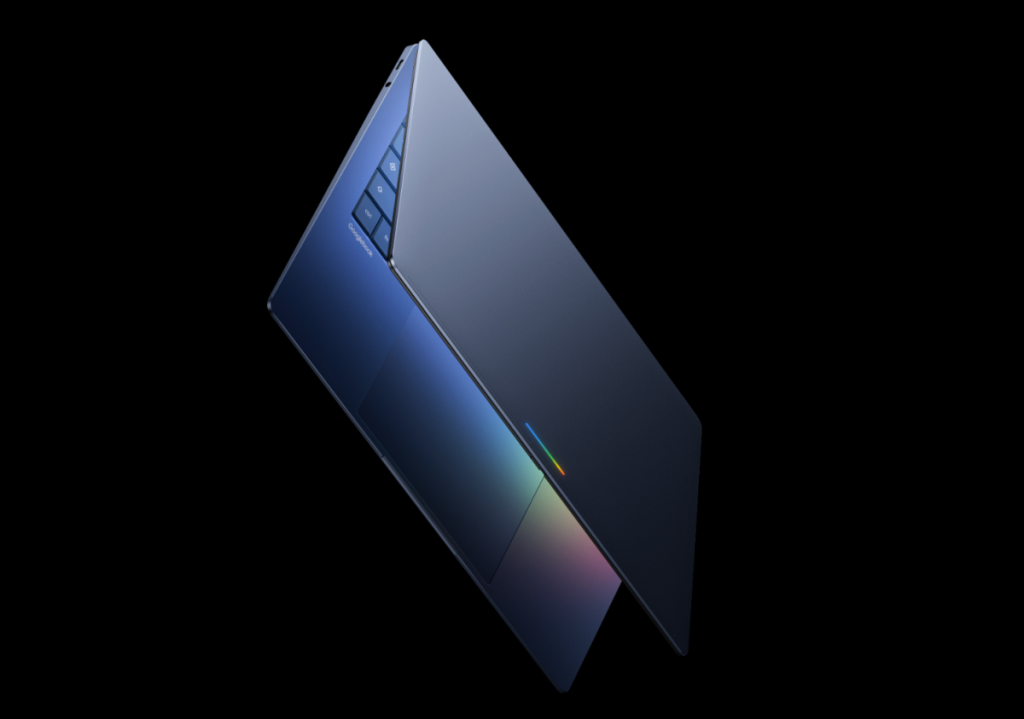
Image Credits:Google /
Google Unveils Major Updates and Features at Virtual “Android Show: I/O Edition”
During Google’s recent virtual event, the “Android Show: I/O Edition,” the tech giant showcased a range of exciting updates and features, primarily centered around enhanced Gemini Intelligence capabilities. Among the announcements were the introduction of Googlebooks, a new line of laptops, as well as additional enhancements to Android, including vibe-coded widgets, Gemini integration in Chrome, and a fresh set of emojis. These updates come just ahead of Google’s annual developer conference, which will place a significant emphasis on AI, similar to the focus from the previous year.
Googlebooks: A New Era of Laptops
Google introduced Googlebooks, a groundbreaking line of laptops designed with Gemini Technology at their core. Collaborating with industry partners including Acer, Asus, Dell, HP, and Lenovo, Googlebooks will launch this fall in various shapes and sizes. These laptops are the first to be built specifically to leverage Gemini Intelligence, aiming to provide users with personal and proactive assistance.
Equipped with the innovative “Magic Pointer” cursor, Googlebooks will also be compatible with Android phones, enabling users to access phone apps directly from their Googlebooks. Additional features include custom widget creation and more intuitive interactions.
Create My Widget: Customization Made Easy
One of the standout features unveiled at the event is the “Create My Widget” functionality. This innovative tool will allow users to vibe-code their own custom widgets, initially available on the latest Samsung Galaxy and Google Pixel phones this summer. By using natural language, users can specify their widget needs—for example, asking to “suggest three high-protein meal prep recipes every week”—to create a personalized dashboard on their home screen.
Enhancements to Android Auto
Android Auto is also receiving a significant update, enhancing personalization and usability. The revamped interface promises an edge-to-edge experience, allowing users to tailor their display according to their vehicle’s screen shape, be it ultrawide, circular, or uniquely shaped. Users can now add various widgets for quick access to essential information, even while navigating.
In a notable first, Android Auto will soon support watching videos from platforms like YouTube in 60fps full HD, compatible with select vehicle brands, including BMW, Ford, and Mercedes-Benz. The Gemini integration will enable drivers to query information hands-free, ask questions, brainstorm ideas, and even place food orders through apps like DoorDash.
Upgraded Emojis
Google is not neglecting the visual aspect of Android, as all 4,000 emojis are set to receive a makeover, launching later this year. These updated emojis aim to be more dynamic and expressive, enhancing user communication.
Innovative Features for Creators
The new “Screen Reactions” feature allows users to record both their screen and themselves simultaneously, similar to formats popular on social media platforms like TikTok and Instagram Reels. Rolling out first on Pixel devices this summer, this function promises to enhance content creation on Android.
Additionally, Google has joined forces with Meta to bring significant Instagram features to Android devices, such as Ultra HDR and native stabilization. The partnership also includes improvements in the capture-to-upload process for sharper photos and videos.
Gemini’s Multifunctional Capabilities
Gemini Intelligence now boasts enhanced agentic features, enabling users to execute multistep functions across apps. For instance, you can snap a photo of an event flyer and ask the assistant to locate that event on platforms like Expedia. Users can also utilize their on-screen grocery list and prompt the assistant to create a shopping cart in their preferred app.
Gemini in Chrome
Following its successful launch on iOS and desktop, Gemini is making its way to Chrome on Android. This feature allows users to summarize web content or ask specific questions based on what they see. An auto-browse feature will also be introduced, which can navigate websites and perform tasks, like booking tickets, on the user’s behalf.
Simplified Form Filling and Dictation
Opt-in features will enable Gemini to assist users in completing complex forms on mobile devices. Furthermore, Google introduced “Rambler,” a new Gboard feature that enhances speech-to-text functionality by eliminating filler words and producing cleaner final results.
Expanded AirDrop Functionality
Last year, Google introduced its Quick Share feature, allowing Pixel phones to share files with iPhones via AirDrop. This year, the functionality will expand to other smartphone users, including Samsung, Oppo, OnePlus, and Xiaomi. If users lack compatible devices, they can generate a QR code to facilitate cloud-based file sharing.
Streamlined iPhone to Android Transfers
Google is also working on a feature that simplifies the transfer process from iOS to Android, allowing users to import essential data such as passwords, photos, messages, and app preferences. This will be available on Samsung Galaxy and Google Pixel devices later this year.
Pause Point: A Break from Distractions
A new Android feature will allow users to pause before accessing apps categorized as distractions. By taking a 10-second break, users will be prompted with alternative, more productive options, such as launching Google Play Books for reading. Additionally, users can set timers to limit their app usage even further.
Enhanced Threat Protection Features
In response to user safety, Google plans to broaden its theft protection features to all Android users globally, building on earlier tests in Brazil. Default settings will activate features like Remote Lock and Theft Detection Lock on all new Android 17 devices. Enhanced security measures will also be applied to devices running Android 10 and later in select regions.
With these comprehensive updates, Google continues to innovate, providing users with advanced features designed to enhance productivity, creativity, and overall user experience on Android devices.
Thanks for reading. Please let us know your thoughts and ideas in the comment section down below.
Source link
#Google #announced #Android #Show #Googlebooks #vibecoded #widgets
About The Author